
Moving off your old file server? Do it with clarity and confidence.
Sope moves your documents off your old file server and into the SharePoint you already have. We agree what comes across, set up the right access and train your people on where things live, so everyone knows what's moving, when, and where to find it.






















Sound familiar?

Our old server isn't getting security updates anymore, and we're not sure who can access what.
We need to decommission our servers before the end of this year.
We tried moving files ourselves before, and it caused more problems than it fixed.
Our staff are nervous about moving to SharePoint. They know where everything is on the old drive.
We don't know how to move 10 years of files without losing track of what's where.
We're over our storage limit, and most of what's on there hasn't been opened in years.
What you've tried and why it hasn't worked
Most teams have already thought about the move. The usual approaches stall because they focus on the deadline and leave out the structure, access and people.
“We'll keep the old server running another year”
Moves like this get pushed back a year at a time. Meanwhile security fixes stop once support ends, old permissions can leave former staff with access, and mapped drives stay a common target for ransomware.
“Our IT team or MSP will do the move”
They know your systems, but they're also handling access requests, support tickets and day-to-day fixes across every platform. That leaves little time to plan the move, set up access properly and train staff so it sticks.
“We'll just copy everything from the old server across”
It looks like the quickest option. But years of folders, copies and access settings come across too, so finding things in the new place can be just as hard.
So how do you move off an old file server smoothly?
Plan first, then move with clarity. Sope works out what comes across, sets it up in the SharePoint you already pay for, moves it in stages and trains your people, so you always know where things stand.
Keeping the old server running another year
Leave security risks behind with a clean, secure SharePoint structure
Sope reviews who can access what before anything moves, removing former staff and contractors who shouldn't still have it. Your files land in SharePoint, which keeps getting security updates, not on mapped drives that ransomware targets.
Leaving the move to your IT team or MSP
Dedicated specialists with the time to do it properly
Sope brings a team focused on your move, with the capacity to plan, move and train on a timeline that suits you. We've delivered hundreds of cloud migrations, and we work alongside your internal IT team or managed service provider the whole way.
Copying everything across as it is
Decide what comes across first
We map what you have, agree with each team what to bring, archive or leave behind, and build a clear structure with the right access. You approve a written plan before anything moves, and get your time back for other priorities.
How a file server move to SharePoint works
Every move follows the same five phases, so you know what's happening at each step and nothing is rushed.
Some steps run side by side, which keeps the move moving without cutting corners. You approve the plan before a single file moves.


Map your old file server
We look at what's on the server, how much there is, who uses it, and what's out of date or duplicated.

Decide what comes across
We agree with each team what moves, what gets archived and what gets left behind, and map every folder to its new home.

Design the structure and access
We set up SharePoint sites and libraries with access by team, remove former staff and contractors, and test it with real files and users.

Move in stages and train
Content moves team by team and is checked as it lands, and your people are trained on where things live now.

Hypercare
30 days of close support after the move, with regular check-ins while everyone settles in.
Who have we helped move to SharePoint?
Organisations across Australia and New Zealand, from a team of 100 to government departments and super funds.

 Not-for-profit · Google Workspace to SharePoint
Australian Conservation Foundation
Staff were working across SharePoint Classic and Google Workspace and weren't sure where to store or find things. Sope moved the content into SharePoint Online, converting Google Docs to Office formats, and set up a permissions framework across 44 team sites.
44 team sites, one place to look
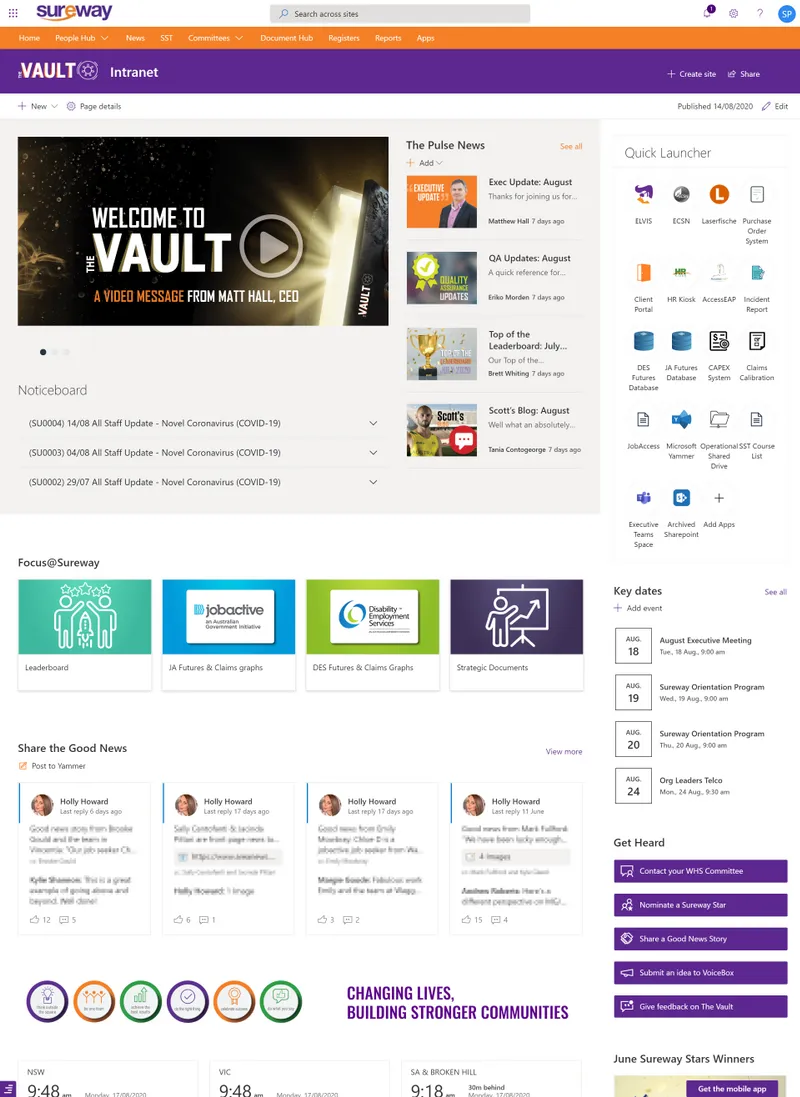
 Employment services · Legacy SharePoint intranet
Sureway Employment and Training
Sureway's old SharePoint intranet had search that didn't work and workflows nearing end of life. Sope worked with them to decide what to carry across and what to remove, built a document hub, and trained staff to manage workflows themselves.
70+ offices
Frequently asked questions
How do we move from an old file server to SharePoint without losing the documents we need?
You move from an old file server to SharePoint without losing the documents you need by mapping what you have first, then agreeing what comes across, what gets archived and what gets left behind. From there, our certified Microsoft consultants build the SharePoint structure and access, test it with real files and users, move content in stages and train your people. The aim is that work carries on while the move happens. It's the same approach we've used across hundreds of cloud migrations over 16+ years.
What other platforms can you move us from?
As well as file servers and network drives, we move organisations off Google Workspace, Dropbox, Box, Confluence and older SharePoint sites and intranets. For Google Workspace, we convert Google Docs to Office formats as part of the move. If you're on something else, tell us what you have and we'll say what's involved, or see our Microsoft 365 migrations.
What happens when support for our system ends?
When a vendor ends support, the system stops getting security updates and fixes. On an old file server the risks add up: known weaknesses stay open, mapped network drives are a common target for ransomware, permissions built up over years are hard to check, and there's little record of who opened or changed what. The safest approach is to plan the move well before the end date, so there's time to decide what comes across, review access and test it.
How much does it cost to move off a file server to SharePoint?
It depends on your scope. The main things that shape the price are how much data you have and where it lives, how much of it needs to come across, how many teams and sites the new structure needs, how complex your permissions are, and how much training your people need. Your free consultation ends with a clear quote, so you know exactly what's included before anything starts.
How long does it take to move a file server to SharePoint?
Most SharePoint projects take around 12 weeks with our 5-phase approach. Projects with a migration or unique requirements can run to around 16 weeks. For example, we brought the Department of Transport and Planning's four intranets into one in 14 weeks. The exact timing depends on how much is on your server. For larger moves from several sources, see our SharePoint migration services.
Do we have to move everything from our old file server?
You usually don't need to move everything from your old file server. A lot of what sits there is out of date or duplicated. We decide with you what to bring, what to archive and what to leave behind, which also makes the new SharePoint easier to use. When we replaced Sureway Employment and Training's old SharePoint intranet, we worked with them to decide what to carry across and what to remove.
We have an IT team or MSP. Why get outside help with the move?
Internal IT teams and MSPs juggle competing requests across many different platforms. That stretches their capacity and leaves little time to go deep on a move like this. We bring specialist migration skills from 670+ projects and 16+ years in Microsoft 365, plus dedicated delivery capacity, working alongside your team rather than around them. For ongoing Microsoft 365 help afterwards, SopeCare is there when you need it.
What's the difference between SharePoint and a file server?
A file server keeps files in folders on a machine you look after, usually reached through mapped drives in the office or over a VPN. SharePoint keeps them in Microsoft 365, so staff can open and work on files from anywhere, with version history, co-authoring, access set by team and security updates handled by Microsoft. It also connects with Teams and OneDrive, so there's one place for each file instead of copies on drives and in email.
Join the hundreds of companies who swear by Sope for moving their old server content to SharePoint


“It's revolutionised our document management system, providing a single source of truth for the organisation.”

“I rank our implementation as one of the easiest technology projects that I have participated in.”
Move off your old file server with confidence
Tell us what you're moving off, and a SharePoint migration specialist will get back to you. You can also book a time to chat right after sending your message.
No obligations. Free consultation.