
Nobody using the intranet you've invested time and money in?
Sope builds and optimises SharePoint intranets around the news, policies and forms your staff need every day, so the time and budget you've put in finally pays off.


Sound familiar?

Leadership keeps asking what we're getting for the money we've spent on our intranet.
The content is out of date and nobody owns it.
It's hard to find anything, so people just email someone to ask.
We launched it with a big push, but within months people went back to email, Teams chats and their own files.
There's no reason to visit our intranet beyond looking for a policy every few months.
Our frontline staff don't sit at a desk, so they never see our intranet.
What you've tried before and why it hasn't worked
Most teams have already tried to get more out of their intranet. The fixes rarely last because they change how it looks, or rely on people who don't have the time, rather than making it more useful in their day.
A new look or homepage
A redesign looks better at launch, but if the content and menus stay the same, people still can't find what they need and go back to email.
“Our IT team will build something.”
Internal IT teams know the tools, but they're also handling access requests, support tickets and day-to-day fixes. That can make it hard to plan an intranet end to end and deliver it in the timeframe the business needs.
Leaving it with one busy person
When every update sits with one person on top of their day job, pages fall behind and staff stop trusting what they read.
So what actually gets people using your intranet?
An intranet designed around the tasks your staff do every day, kept up to date by someone in each team, and easy to reach for everyone, including frontline workers. Whether you improve the one you have or build a new one, that's what Sope delivers.
A homepage redesign that leaves the menus and content as they were
Menus, search and a homepage built around everyday tasks
We survey and talk to staff across teams and locations to find what they look for most, then set up your SharePoint menus, search and homepage around it: news from every team in one feed, policies, forms and people. Staff find answers themselves instead of emailing someone to ask, so the intranet becomes the first place they go.
An internal team without the capacity
Specialists who plan it and deliver it in the timeframe you need
A Sope intranet specialist works out what your staff need with the people who use the intranet every day, then sets it up and tests it with your team. We work alongside your internal IT team or managed service provider throughout, then train the people who'll look after it and hand it over with documentation.
Leaving it with one busy person
Trained page editors in every team, with review dates
We train a nominated person in each team to update their own pages, give every page a review date, and set up SharePoint usage reports so you can see what's working. Content stays current long after launch, staff trust what they read, and you can show leadership the intranet is being used.
How Sope gets your people using your intranet
Two ways in, depending on where your organisation and intranet are at today.
Need something else, or just want advice?
Whose intranets have we brought back to life?
Organisations across many industries in Australia and New Zealand, from single sites to hundreds of locations.
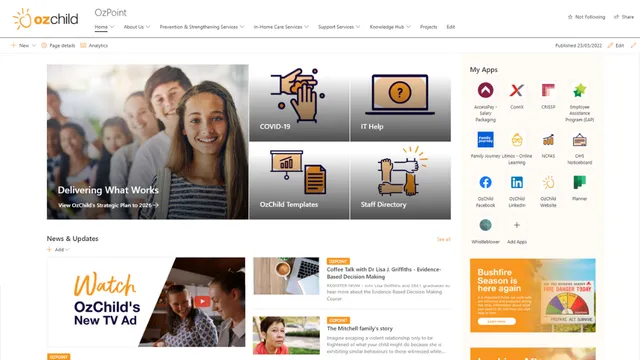

OzChild
100% adoption in 30 days.
Read the case study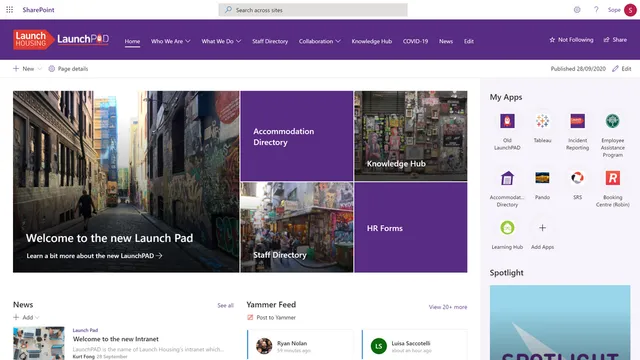

Launch Housing
From almost zero to 100% engagement.
Read the case study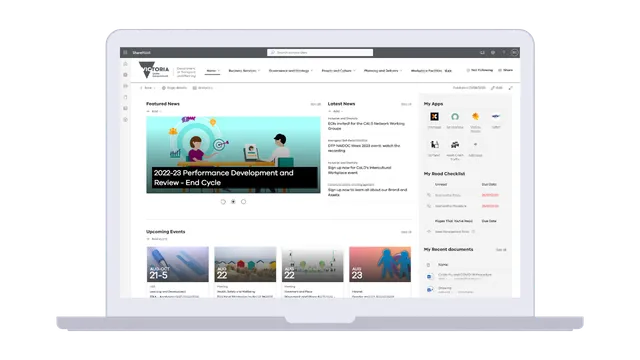

Victorian Department of Transport and Planning
Four intranets brought together into one for 5,000+ staff, with 326,853 visits in the past 30 days (July to August).
Read the case study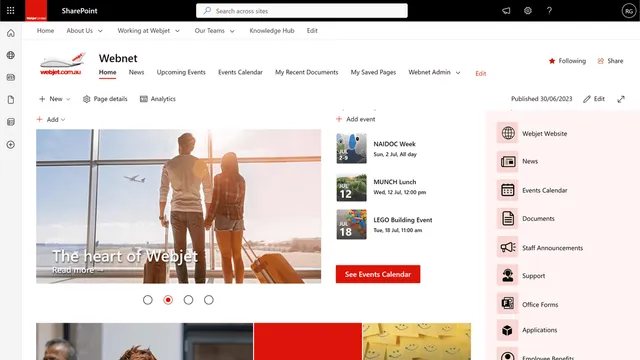

Webjet
A SharePoint intranet with 133,629 visits, bringing around 10,000 documents across 18 sites into one place.
Read the case study
Frequently asked questions
Why don't staff use our intranet?
Staff usually don't use your intranet because it doesn't help them do their job. Content is hard to find or out of date, it isn't built around everyday tasks, staff haven't been shown how to use it, and frontline workers can't easily reach it. Fixing those things matters more than a new look. When the Department of Transport and Planning came to us, it had four different intranets, so staff had no single place to look. Bringing them into one gave more than 5,000 staff one source of truth.
How do you increase intranet engagement?
You increase intranet engagement by making the intranet the most useful place for staff to go. Design it around the tasks staff do most, keep content current with someone responsible in each team, keep training going after launch, make it easy on mobile, and use it as the main channel for news instead of all-staff email. When Launch Housing moved to its new intranet, it went from nine users across 450 staff the week before the old site closed to every staff member using the new one. See how we build intelligent intranets.
Should we improve our current intranet or build a new one?
It depends on what's holding your current intranet back, and the best place to start is a chat. We'll talk through what's working, what isn't and what matters most to your organisation, and help you set priorities. From there, an Intranet Optimisation review can show whether improving what you have is enough, or whether a new intranet makes more sense. Have a chat with us.
What's included in Sope's Intranet Optimisation?
A full review of your existing SharePoint intranet. It includes a discovery workshop, a platform and analytics review, a content and structure audit, a permissions and governance review, and a staff survey and consultations. It ends with an insights presentation, quick wins and a prioritised list of improvements. Afterwards, we're happy to talk through how you could put the improvements in place, whether your team takes them on or we help.
How long does a new SharePoint intranet take?
Most new SharePoint intranet projects take around 12 weeks with our 5-phase approach. Projects with a migration or unique requirements can run to around 16 weeks. A proper launch under these standard timelines can then pay off quickly: OzChild's intranet reached 100% adoption within the first 30 days.
How much does it cost to improve or build an intranet?
It depends on your scope, such as whether you're improving an existing intranet or building a new one, how much content you have and whether you need a migration. We start with a conversation and, if it's useful, a short discovery. Larger work can be phased, and we can give you indicative estimates for budgeting. Have a chat with us about what you'd like to achieve.
Can frontline staff without a desk use a SharePoint intranet?
Yes. SharePoint intranets work on phones and tablets, so site, shift and field staff can see news, policies and forms wherever they are. The Department of Transport and Planning's intranet reaches staff right across Victoria, from Echuca and Mildura out to Portland and Hamilton. Microsoft also offers lower-cost licences made for these workers. Microsoft 365 F1 gives staff the communication tools they need, like Teams and SharePoint, so they can read news and find policies and forms. Microsoft 365 F3 adds web and mobile versions of Office apps like Word and Excel. See Microsoft 365 for frontline workers.
We already have an internal IT team. Why would we need external help?
You'd bring in external help when your IT team doesn't have the time to deliver an intranet alongside everything else. Internal IT teams are busy keeping the business running day to day, and support tickets, access requests and urgent fixes keep pulling their attention elsewhere, which can stretch an intranet project well past the timeframe you need. Sope brings specialist intranet skills, dedicated time and an impartial view of what staff need, working alongside your IT team rather than around them. At the Department of Transport and Planning, for example, we trained hundreds of content authors so each business area could look after its own pages.
Can Sope work alongside our managed service provider?
Yes, Sope can work alongside your managed service provider. We regularly work with MSPs: we focus on the specialist intranet and SharePoint work, such as design, setup, content structure and staff training, while your MSP looks after your general IT environment, including non-Microsoft 365 systems. We agree who does what at the start, so nothing falls through the gaps.
Join the hundreds of companies who swear by Sope for SharePoint intranets


“Sope’s willingness to work with us on customisations to suit our organisation and staff was exceptional and our transition to our new Intranet was smooth and highly successful.”

“Building intranets is Sope’s core business – it’s something they have years and years of experience in. They have the right partnerships and relationships, and they could work in the direction we wanted to go.”
“I’ve looked at some data very quickly, and every staff member has used it at some point.”
Let's get your people using the intranet you've invested in
Tell us what's going on, and an intranet specialist will get back to you. You can also book a time to chat right after sending your message.
No obligations. Free consultation.